Training OCR Model for Diablo 2 Font
Preface
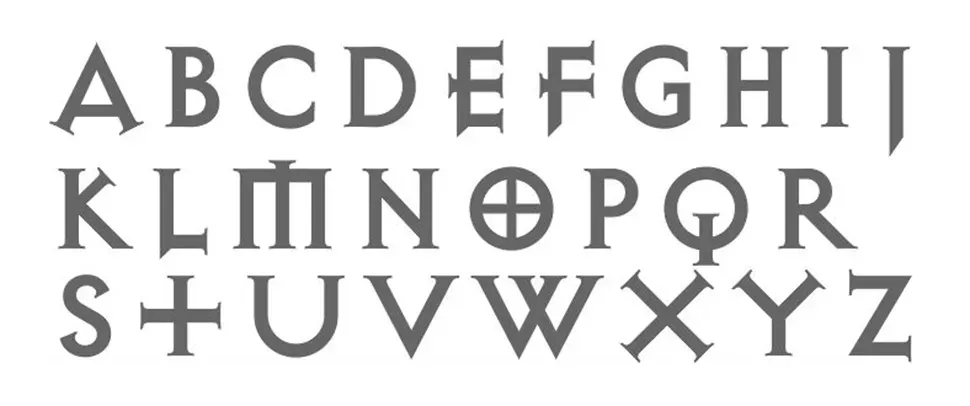
Diablo games use Exocet typeface (see above), designed in 1991 by Jonathan Barnbrook. I wouldn’t be able to train the model if I didn’t have the actual font file. While I was looking for it, I read about Exocet history and let me tell you something.
The first Diablo game was released in 1996. Did you know that Exocet was used, I think for the first time, in 1993? In Demolition Man (1993) we see Sylvester Stallone in a Hall of Violence.
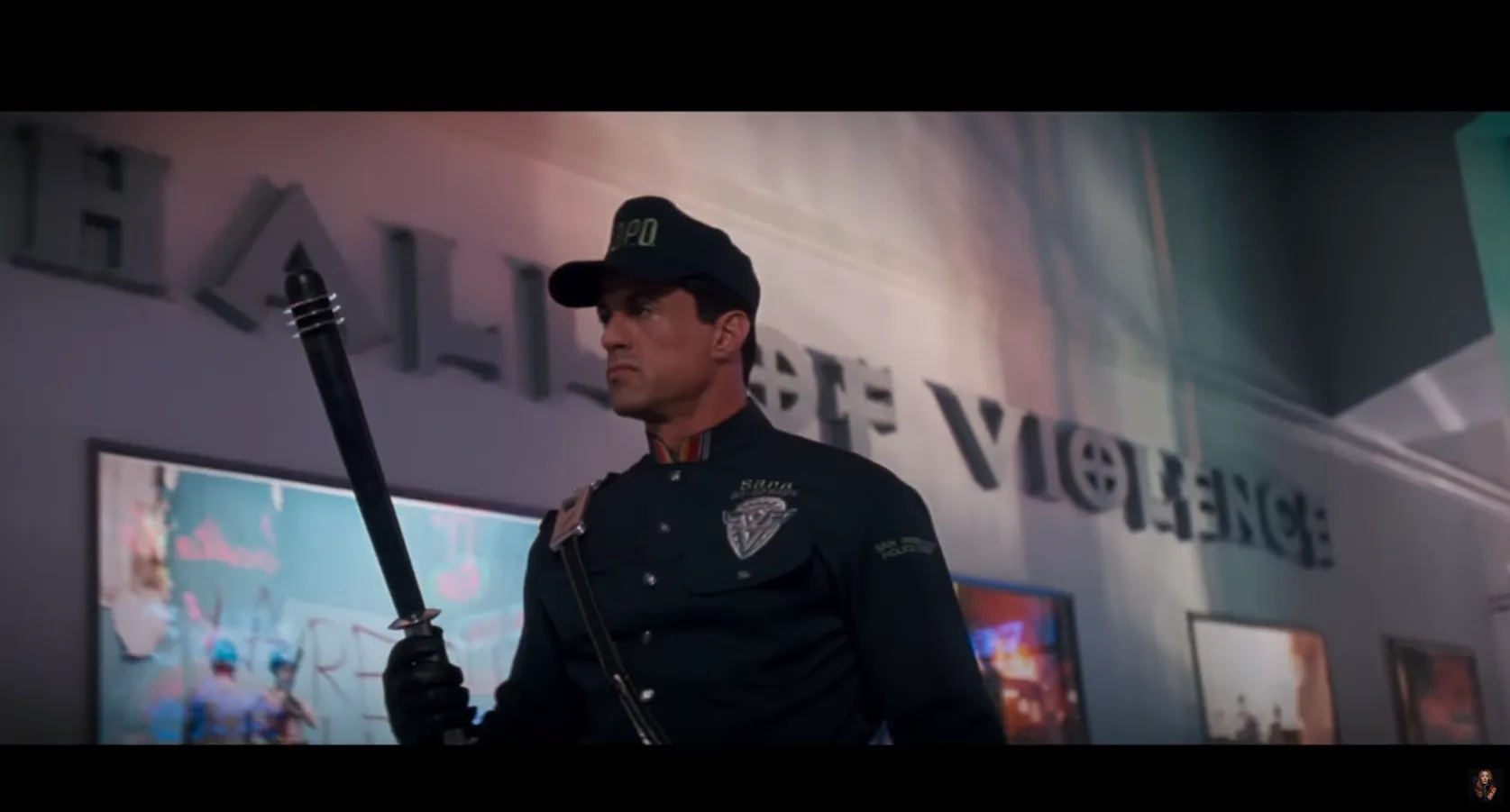
Looks weird after all my Nihlathak runs, as if there was a 4th level after Halls of Pain, Halls of the Dead or Halls of Vaught.
Local environment setup
Once I found the font I started to google for tutorials. I knew nothing about tesseract or OCR and apparently there are many breaking changes between tesseract major versions, so you can’t just combine the knowledge of tutorials from 2017, 2019 and 2021. I’ve decided to stick to something that’s guaranteed to work without an enormous time investment.
I’ll be honest. If it wasn’t for Gabriel Garcia tutorial, I’d probably give up. Here’s their GitHub and YouTube. Sometimes it’s difficult to follow this tutorial, because you need to clone a few repos (all maintained by Tesseract OCR Github org), copy a few files, run a few commands… You really need to know what you’re doing.
One thing worth mentioning upfront: Tesseract expects black text on white background at ~300 DPI. Game screenshots are the opposite of that, dark backgrounds, colored text, varying resolution. I had to preprocess the Diablo 2 screenshots with OpenCV (thresholding, inversion, scaling) before feeding them to the model. More on that in the last step.
Requirements:
Tesseract 4.1. As of today the latest Tesseract is 5.1 but this guide uses 4.1. I tried to run it with 5.1 but ran into some problems so without getting into the details, let’s just use 4.1.
git clone [email protected]:tesseract-ocr/tesseract.git --branch 4.1 --single-branchlangdata_lstm. If you don’t know what LSTM stands for, here’s the Wikipedia definition
Long short-term memory (LSTM) is an artificial neural network used in the fields of artificial intelligence and deep learning. Unlike standard feedforward neural networks, LSTM has feedback connections. Such a recurrent neural network can process not only single data points (such as images), but also entire sequences of data (such as speech or video). For example, LSTM is applicable to tasks such as unsegmented, connected handwriting recognition […]
This repo does not contain a trained neural network, but data that is used for LSTM model training. It contains all allowed characters, punctuation marks, numbers and more.
This repo is huge (~1.2GB) and we only need English language, but there are some common files in a few places so instead of taking the risk, I prefer to clone it all.
git clone [email protected]:tesseract-ocr/langdata_lstm.gittessdata_bestrepo contains the most accurate, already trained LSTM models for many languages. As I needed the English one, I download onlyeng.traineddatamodel. It’s loaded automatically if saved in./tesseract/tessdata, the directory that was cloned in step 1.
wget https://github.com/tesseract-ocr/tessdata_best/raw/main/eng.traineddata -P ./tesseract/tessdataTraining the model for custom font
All points here are organized tl;dw of Gabriel’s video.
- Generate training the data
#!/bin/sh -x

rm -rf train/*
./tesseract/src/training/tesstrain.sh --fonts_dir fonts \
	--fontlist 'Exocet Light' \
	--lang eng \
	--linedata_only \
	--langdata_dir langdata_lstm \
	--tessdata_dir tesseract/tessdata \
	--save_box_tiff \
	--maxpages 200 \
	--output_dir train
This command creates 200 pages of text, written with Exocet Light font, using English language.
- Extract LSTM
#!/bin/sh -x

combine_tessdata -e tesseract/tessdata/eng.traineddata eng.lstm
It wasn’t obvious in the video what is actually happening. The video glosses over this command, but the correct tool to extract the components is combine_tessdata -e.
Docs say
combine_tessdata is the main program to combine/extract/overwrite/list/compact tessdata components in [lang].traineddata files.
and
The result will be a combined tessdata file /home/$USER/temp/eng.traineddata Specify option -e if you would like to extract individual components from a combined traineddata file.
This extracts the actual LSTM model from the package.
- Initial evaluation
#!/bin/sh -x

lstmeval --model eng.lstm \
	--traineddata train/eng/eng.traineddata \
	--eval_listfile train/eng.training_files.txt
Using the training data and the English model, without additional training, let’s see how this model performs on Exocet Light.
Truth:placed PopSet Room Surgery » Health SPELLINGS. RESULT POLLEN have VITAMINS.
OCR  :vFlsPR v FRr F IRTH YRr RTM §;e IO YdRY h j URs lTHT Ux IFRl§e dIx YRIOxlD|i FRrlR§e Us B R B§|se§|§eIx
Truth:Rights TOWN'S Castor Rome, Metacafe RETURNS very DOWNLOAD. HATES GOODNESS.
OCR  :§Y§d§U HDIi |RIVTM°c C e D«DIi PsI TH VTMr Yx YRr §;e Ri ; RTHT s P s t Rx YR | 1Oh YeIx BRYDh vRsrD C el RTMu s ev x Us | RxI dRsr ITMr v e RxIxIx
Well, I’d say pretty bad. This font is so custom that the word error rate is 99.6…
At iteration 0, stage 0, Eval Char error rate=171.56924, Word error rate=99.602939- Training the model
#!/bin/sh -x

mkdir output

rm -rf output/*
OMP_THREAD_LIMIT=32 lstmtraining \
	--continue_from eng.lstm \
	--model_output output/d2 \
	--traineddata tesseract/tessdata/eng.traineddata \
	--train_listfile train/eng.training_files.txt \
	--max_iterations 10000
The docs say
lstmtraining(1) trains LSTM-based networks using a list of lstmf files and starter traineddata file as the main input. Training from scratch is not recommended to be done by users. Finetuning (example command shown in synopsis above) or replacing a layer options can be used instead.
As we might expect, it’s not training the model from scratch. The documentation calls this process fine-tuning an already existing model. Training models from scratch requires thousands of pages of data. Fine-tuning lets you get results with just 200 pages because you’re standing on the shoulders of the existing English model.
I was experimenting with different numbers and there’s always a risk of overfitting, but I found out that generating 200 pages of text and training with 10000 iterations works great for me, though after ~9000 iterations the model wasn’t able to improve itself.
So the initial output of this command was
Loaded file eng.lstm, unpacking...
Warning: LSTMTrainer deserialized an LSTMRecognizer!
Continuing from eng.lstm
Loaded 10400/10400 lines (1-10400) of document train/eng.Exocet_Light.exp0.lstmf
2 Percent improvement time=100, best error was 100 @ 0
At iteration 100/100/100, Mean rms=3.839%, delta=22.623%, char train=59.315%, word train=73.472%, skip ratio=0%,  New best char error = 59.315 wrote best model:output/d259.315_100.checkpoint wrote checkpoint.
...
30 minutes later...
...
At iteration 9995/10000/10000, Mean rms=2.484%, delta=9.625%, char train=30.41%, word train=51.343%, skip ratio=0%,  New worst char error = 30.41 wrote checkpoint.

Finished! Error rate = 30.035
- Making this model usable
lstmtraining --stop_training \
	--continue_from output/d2_checkpoint \
	--traineddata tesseract/tessdata/eng.traineddata \
	--model_output output/d2.traineddata
The --stop_training command merges your fine-tuned layers back into the original English network. That’s why the output file remains large, it retains all the knowledge of the base English model plus your Exocet-specific training.
Note: if output/d2_checkpoint doesn’t exist, look for the file ending in .checkpoint with the lowest error rate in your output folder. Tesseract usually creates a symlink named _checkpoint, but if it doesn’t, you need to pick the specific numbered file yourself.
- Evaluating the trained model
lstmeval --model output/d2.traineddata \
	--traineddata tesseract/tessdata/eng.traineddata \
	--eval_listfile train/eng.training_files.txt
Truth:placed PopSet Room Surgery » Health SPELLINGS. RESULT POLLEN have VITAMINS.
OCR :PlaceD Popset RooM SURGERY » Health SpellinGs. RESULT Pollen Have VITAMINS.
Truth:Rights TOWN'S Castor Rome, Metacafe RETURNS very DOWNLOAD. HATES GOODNESS.
OCR :rights TowNn's Castor ROoMme, Metacafe RETURNS Very DownloAd. HATES Goodness.It’s perfect! I ran a few tests in my Python script and it did match all the words from the in-game screenshot.
At iteration 0, stage 0, Eval Char error rate=30.553671, Word error rate=49.250753This word error of 49.25 might look bad, but I couldn’t find a way to make it case-insensitive, and that’s the reason for such a high error rate. Unlike the video tutorial, which achieved a 0.37% error rate because it focused on numbers, my error rate remains high solely due to case sensitivity. Look at the output above: “PlaceD” vs “placed”, “SpellinGs” vs “SPELLINGS”. The text content itself is accurate, which was the goal.
Let’s just say Exocet was not created to make lowercase and uppercase characters easy to distinguish.
- Using the model in Python script
Remember the preprocessing I mentioned earlier? Tesseract is trained on 300 DPI black-on-white text. Diablo 2 screenshots are the polar opposite. Before feeding screenshots to the model, I had to preprocess them with OpenCV: convert to grayscale, apply thresholding to get clean black text on white background, and scale the image up. Without this step, even the fine-tuned model produces garbage.
import pytesseract

df = pytesseract.image_to_data(
            preprocessed_image_in_cv2,
            output_type=pytesseract.Output.DATAFRAME,
            lang='d2',
            config='--tessdata-dir path-to-font'
        )
The dataframe with text is ready to be used. Tesseract also has some known quirks with certain characters, for example it tends to confuse + with 4. But for my use case, reading location names and item descriptions in Diablo 2, the fine-tuned model with proper preprocessing worked reliably.